Using Calendar Icon to Set Date(s)
Module: Most
Topic: Using Calendar Icon to Set Date(s)
Version(s): 5.1& up
Editions: All
Using Calendar Icon to Set Date(s)
There are many places within your OrderLogix instance where a date needs to be selected
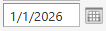
. You can manually type in a date in the mm/dd/yyyy format OR you can use the calendar

icon to select the date.
- Clicking on the calendar icon will display a calendar view popup of the current date.

goes back 3 months prior
goes back to 1 month prior- clicking on the month/year
will display an additional popup 
- you can select a specific month

- you can select a specific year

moves back to 10 previous years
moves forward to next 10 years
- clicking Today
button will set the calendar to the current month - clicking OK
button will set the calendar to the month and year selected - clicking Cancel
button will exit out of the month/year popup with no selection made
goes to the immediate future next month
skips ahead to 3 months in future
Copyright 2026
Revised 1.07.2026
Related Articles
Calendar
Module: Home Path: Left Menu Topic: Calendar Version(s): R20.9 and prior Editions: All This feature has been removed in R21 The system has a built in calendar accessory to help you manage your day, and the events that are created within the schedule ...
Using The Help Desk
What is the Help Desk? The Help Desk is where you can: create and review support tickets review User Guide articles review Developer Specs Getting Started Creating User Please ask an Admin within your company to send an email to ...
Void Report Definitions
Module: Reports Path: Reports > Processing Reports > Void Report Topic: Void Report Version(s): 5.1 and up Editions: All What Is Void Report Processing Reports Void Report - View real time auth transactions that were voided in the date range. Making ...
Quality Assurance Campaign Report Definitions
Module: Reports Path: Reports > Survey Reports > Quality Assurance Campaign Report Topic: Quality Assurance Campaign Report Version(s): 5.1 R29 and below Editions: All As of R21 Surveys and related modules have been deprecated What Is Quality ...
Order Submission Status Report
Module: Reports Path: Reports > Processing Reports > Order Submission Status Report Topic: Order Submission Status Version(s): 5.1 & up Editions: All What Is Order Submission Status Report This report is used to track API exceptions which are still ...