Module: Sales Order Entry Topic: Call/Order Wrap Up Version(s): Version 5.1 and up Editions: Standard, Commerce, Call Center
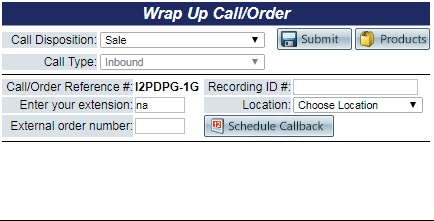
Choose a call disposition from the drop down menu.
If the DNIS that you have used to enter the order screen has a "Call Type" chosen in the source that states to "Prompt the user for call type," you will have to select the call type from the drop down menu. If the source has a call type value associated instead of asking for it to be entered, this value will be defaulted in the wrap up screen.
Fill in your Extension, External Order Number, and Voice Recording ID, if applicable.
Click the Submit button to submit the information.
To return to the list of products, click the Products button.
 Module: Sales Order Entry